

Grade Calculator for Teachers Who Use Curves
Grading can be stressful, especially when you’re using a curve. A Grade Calculator for Teachers Who Use Curves helps you save time, stay fair, Quick Grade and give students grades that reflect true performance.
Curved grading is common in high schools and colleges. It adjusts student scores so the final grades fit a curve, often making the class distribution look more balanced.
In this guide, I’ll walk you through how curved grading works, how to calculate grades using a curve, and share tips that make the process easy.
What Is Curved Grading?
Curved grading adjusts scores based on the overall performance of a group, not just on a fixed scale like 90 = A, 80 = B, and so on.
When a curve is applied, the average class score becomes the center of the grade distribution. This helps if a test was unexpectedly hard or if scores are clustered very low or very high.
Think of curved grading as “normalizing” the scores so they fit a pattern that feels fair and consistent.
How Does a Grade Curve Work?
There are a few common ways teachers use curves. The most popular methods are:
1. Adjusting by a Fixed Number
This is the simplest curve. If the highest score on a test is 85, you might add 15 points to everyone’s score so the top becomes 100.
So if a student had 70, after adding 15, that student would have 85.You can also read: How to Calculate Grades From Rubric Scores
2. Percentage Based Curve
Instead of adding points, you scale everyone’s score so the highest becomes 100%.
For example, if a student earned 75/90, you divide:
Scaled score = (75 ÷ 90) × 100 = 83.3%
This method keeps the proportions the same but scales them up or down.
3. Standard Deviation Curve
This method looks at how scores are spread out. Teachers use the average and standard deviation to adjust grades. It’s common in large classes or more competitive subjects.
You don’t need advanced tools to calculate this — a calculator or spreadsheet works well.
Step‑by‑Step: Using a Curve With a Grade Calculator
Here’s how most curved grading works in practice:
Step 1: Collect All Raw Scores
List all student scores for the test or assignment.
Example class scores:
65, 78, 82, 56, 91, 73
Step 2: Calculate the Highest Score
If you’re using a fixed number or percentage‑based curve, find the highest score.
In this case, the highest score is 91.
Step 3: Apply Your Curve
Fixed number method:
If you want the top score to be 100, then you add 9 points to everyone’s score.
Percentage method:
Scale each score by dividing by 91, then multiplying by 100.
Example for 78:
(78 ÷ 91) × 100 ≈ 85.7
Step 4: Assign Final Grades
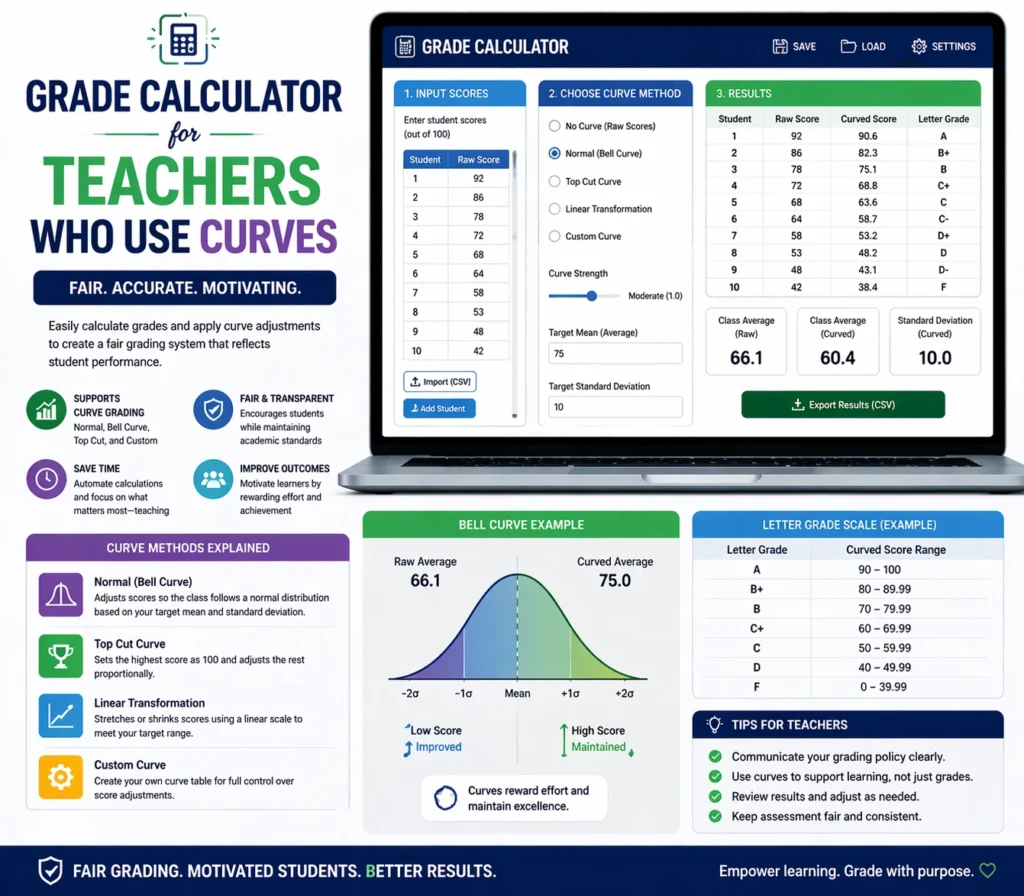
Once you have curved percentages, you match them to your grade scale:
90–100 = A
80–89 = B
70–79 = C
etc.
This gives every student a fair outcome based on the curve method you chose.
Tips to Use a Grade Calculator With Curves
Here are easy tips to make curved grading smooth:
Use a spreadsheet:
Google Sheets or Excel can calculate the curve for you with formulas.
Decide your curve method before you grade:
This keeps results fair and consistent.
Communicate with students:
When students know you’re using a curve, they understand expectations better.
Check your school policy:
Some schools limit how much you can curve grades, so always follow your guidelines.
When Should You Use a Curve?
Curves make sense when:
- A test was harder than expected
- Scores are too clustered in a low range
- You want to bring balance to the distribution of grades
A curve isn’t needed if most students performed well or the scores spread naturally.
Common Mistakes Teachers Make With Curves
Here are a few things to avoid:
Not checking the distribution before curving.
If scores are already well spread, a curve can distort the grades.
Applying too large a curve.
Big adjustments can make low scores suddenly become high grades, which may feel unfair.
Using the same curve method for every situation.
Different tests may need different approaches.
FAQs About Grade Calculators and Curved Grading
1. Can any grade calculator handle curved grades?
Most basic calculators don’t adjust scores automatically for curves. You may need a spreadsheet or a specialized grade calculator.
2. Does curved grading raise everyone’s grade?
Not always. Some curves adjust scores so the average becomes a certain grade, meaning some students might stay the same or go down if needed.
3. Is curved grading fair?
It can be fair if done consistently, but it depends on class performance and expectations.
4. Can students see how the curve was calculated?
Yes. Showing students how the curve was applied builds trust and transparency.
5. Do all teachers use curves?
No. Some teachers prefer straight grading. Curve use varies by subject, level, and school policy.
Final Thoughts
Curved grading doesn’t have to be confusing. With a simple grade calculator and a clear method, you can adjust scores in a way that feels fair and makes sense.
Whether you add points, scale percentages, or use standard deviation, choose a method that fits your class and helps students succeed.


