

How Canvas Grade Calculators Really Work
Students use Canvas grade calculators to check progress, predict final scores, and understand how every assignment affects a course grade. Canvas makes grading easier because it automatically updates percentages after teachers enter scores. Quick Grade,Many students still get confused because weighted grades, missing assignments, and hidden totals can change the numbers they see.
Canvas grade calculators work by combining assignment scores, assignment groups, and grading rules into one overall percentage. Some courses use simple point totals while others use weighted categories like quizzes, homework, projects, and exams. Understanding the system helps students avoid surprises before final exams and gives them better control over study plans.
What Is a Canvas Grade Calculator
A Canvas grade calculator is a tool that estimates or tracks course grades inside the Canvas learning management system. Students use it to see their current average and predict future results based on possible assignment scores.
Canvas already includes built-in grade calculations in most courses. Many students also use external calculators because some teachers hide totals or use special grading methods. External tools help students manually enter assignment weights and test different scoring scenarios.
How Canvas Calculates Grades
Canvas mainly uses two grading methods. The first method is total points grading, and the second is weighted grading. Schools and instructors choose the method that matches their course structure.
Total Points System
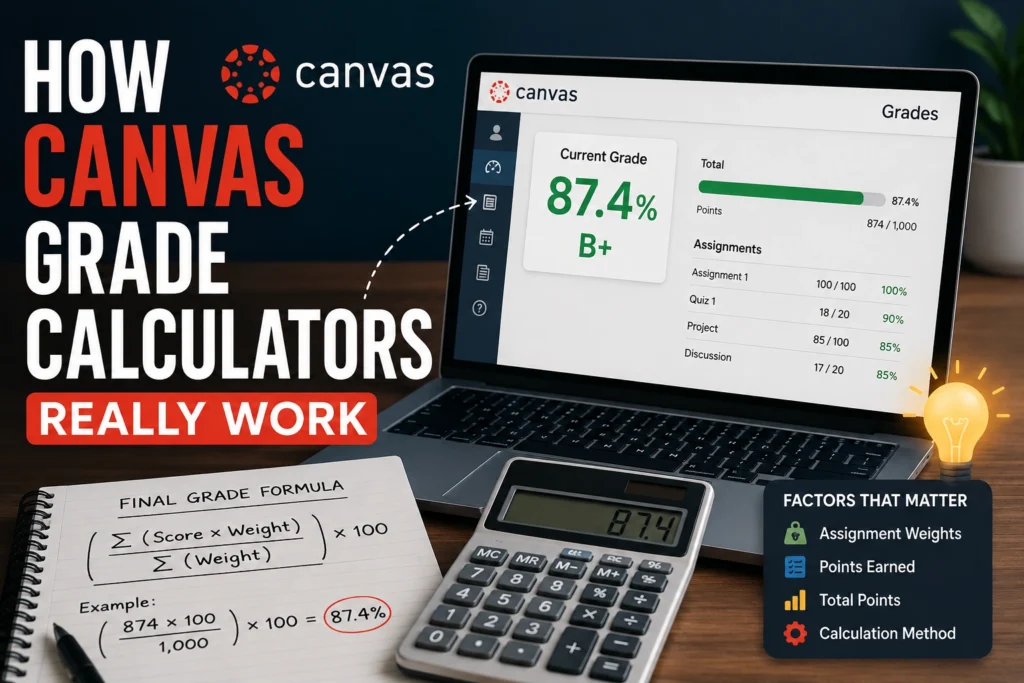
The total points system adds all earned points together and divides them by the total possible points. This method is simple because every assignment directly affects the final percentage.
Here is the basic formula:
Final Grade=Total Points PossiblePoints Earned×100
A student who earns 450 points out of 500 total points would have a 90% course grade. Smaller assignments usually affect the grade less because they carry fewer points.
Weighted Grading System
The weighted grading system separates assignments into categories. Each category has its own percentage weight in the final course grade.
A common weighted structure may look like this:
| Assignment Category | Weight |
|---|---|
| Homework | 20% |
| Quizzes | 25% |
| Midterm Exam | 25% |
| Final Exam | 30% |
Canvas first calculates averages inside each category. Canvas then multiplies each category average by its assigned weight before combining everything into the final grade.You can also read: Easy Grader for Standards and Mastery Scores
The weighted grading formula looks like this:
Final Grade=∑(Category Average×Category Weight)
Weighted systems can confuse students because a low quiz grade may matter less than one major exam score.
Why Canvas Grades Sometimes Look Wrong
Many students think Canvas has calculation errors when grades suddenly change. Most of the time, the issue comes from grading settings chosen by the instructor.
Missing Assignments
Canvas may ignore ungraded assignments until teachers enter scores. A student might see a high grade early in the semester because unfinished work is not included yet.
Some instructors also use automatic zero policies for missing assignments. Grades can drop quickly after those settings become active.
Hidden Grade Totals
Some instructors disable grade totals in Canvas. Students only see assignment scores without the full course average.
Students often use external grade calculators in these situations. Manual calculations help estimate performance before official grades appear.
Assignment Weighting Confusion
Weighted categories create confusion when students focus only on assignment points. A 100-point homework assignment may still affect the final grade less than a 20-point exam if the exam category carries more weight.
Understanding category percentages matters more than looking only at raw scores.
How Students Use Canvas Grade Calculators
Canvas grade calculators help students plan smarter study strategies during the semester. Many students use them before midterms and finals to estimate required scores.
Predicting Final Exam Scores
Students often ask how many points they need on the final exam to pass a class. Grade calculators make this process easier by estimating target scores.
Here is a common example:
- Current grade: 82%
- Final exam weight: 30%
- Desired final course grade: 85%
The calculator estimates the required exam score using weighted formulas.
Tracking Academic Progress
Grade calculators show weak subject areas quickly. Students can identify whether quizzes, homework, or exams hurt the average most.
This visibility helps students prioritize assignments with the highest impact.
Reducing Grade Anxiety
Many students feel stressed because they do not understand grading systems clearly. Simple calculators remove guesswork and provide realistic expectations.
Students feel more confident when they know exactly where they stand academically.
Features Found in Modern Canvas Grade Calculators
Modern grade calculators include more than basic percentage formulas. Many tools now offer advanced academic tracking features.
Weighted Grade Support
Weighted grade support allows students to add category percentages manually. This feature helps when instructors use assignment groups.
Weighted support is important because many colleges use category-based grading systems.
What-If Grade Predictions
Some calculators let students test hypothetical scores. Students can enter possible exam results and instantly see projected final grades.
This feature helps students create realistic study goals before major assessments.
GPA Conversion Tools
Many calculators now include GPA estimators. Students can convert percentage grades into GPA values for scholarship tracking and academic planning.
These tools are especially useful for college students applying for internships or graduate programs.
Mobile-Friendly Design
Students often check grades on phones between classes. Mobile-friendly grade calculators improve convenience and accessibility.
Fast-loading tools also perform better for SEO because page speed matters in Google rankings.
Common Mistakes Students Make With Grade Calculators
Many grade prediction errors happen because students enter incorrect information. Small mistakes can create inaccurate final estimates.
Ignoring Assignment Weights
Some students only add raw scores without category percentages. This mistake produces unrealistic grade calculations.
Always check the course syllabus for official assignment weights before using a calculator.
Forgetting Missing Work
Missing assignments can dramatically reduce averages later in the semester. Students sometimes calculate grades without including zeros for incomplete work.
Accurate calculations require every assignment to be included.
Confusing Percentage and Points
A 90 out of 100 assignment score is not always equal to 90% of the course grade. Category weighting changes how much each assignment matters.
Understanding the grading structure prevents confusion.
How Teachers Set Up Canvas Gradebooks
Teachers configure grading systems inside the Canvas gradebook. Assignment groups, grading rules, and score visibility all affect student calculations.
Assignment Groups
Teachers organize coursework into categories such as homework, quizzes, labs, and exams. Each category may receive its own grading weight.
Assignment groups simplify grade organization and help students understand course priorities.
Dropped Lowest Scores
Canvas allows instructors to drop the lowest assignment scores automatically. This feature protects students from one poor performance.
Dropped-score settings can change averages significantly during the semester.
Grade Visibility Settings
Teachers can choose whether students see current totals or only assignment scores. Hidden totals prevent confusion when grades are incomplete.
Students should review course settings before assuming a displayed score is final.
Best Tips for Using a Canvas Grade Calculator
Students get better results when they use calculators consistently throughout the semester.
Update Grades Weekly
Weekly updates prevent surprises before exams. Students can spot problems early and improve weaker categories faster.
Regular tracking also reduces end-of-semester stress.
Double-Check Course Syllabi
Course syllabi explain grading policies clearly. Weight percentages, late penalties, and extra credit rules usually appear there.
Always compare calculator settings with official course instructions.
Focus on High-Impact Categories
Weighted grading means some assignments matter more than others. Students should spend extra time on heavily weighted exams and projects.
Smart prioritization improves grades more efficiently than random studying.
Why Grade Transparency Matters for Students
Grade transparency improves motivation and academic planning. Students perform better when they understand how grades are calculated.
Canvas grade calculators help students make informed decisions about assignments, study schedules, and exam preparation. Clear grading systems also reduce confusion between instructors and students.
Frequently Asked Questions
How accurate are Canvas grade calculators
Canvas grade calculators are usually very accurate when students enter the correct assignment scores and category weights. Accuracy depends on using the same grading setup that the instructor uses inside Canvas.
Students should always check the course syllabus before calculating grades manually. Missing assignments, hidden scores, or extra credit can slightly change the final results.
Why does my Canvas grade change suddenly
Canvas grades often change when teachers enter missing assignments or update category weights. Grades may also shift after late penalties or dropped-score rules are applied.
Many students notice large grade changes near midterms and finals. Regularly checking assignment updates helps avoid surprises.
Can Canvas calculate weighted grades automatically
Canvas can automatically calculate weighted grades when instructors enable assignment group weighting. The system multiplies each category average by its percentage weight before calculating the final grade.
Students can still use external calculators for better predictions and “what-if” score testing.
What happens if assignments are not graded yet
Canvas may temporarily ignore ungraded assignments until teachers enter scores. This setup can make current grades appear higher than the real course average.
Students should estimate future grades carefully by including expected missing scores manually.
Are external Canvas grade calculators safe to use
Most simple grade calculators are safe because they only require manual score entry. Trusted calculators do not usually ask for Canvas usernames or passwords.
Students should avoid websites requesting personal school login details. Secure calculators work without direct account access.
Final Words
Canvas grade calculators make it easier for students to understand how course grades really work. Simple grade tracking helps students plan ahead, reduce stress, and focus on assignments that matter most.
Understanding weighted grades, assignment groups, and missing work can prevent confusion during the semester. Students who regularly monitor grades often make smarter study decisions and improve academic performance faster.


