

Predict Final Grades Using a Simple Grading Calculator
Have you ever wondered exactly what you need QuickGrade on your final exam to reach your target grade? Or maybe you’re a teacher trying to quickly estimate final scores without manual math? Using a simple grading calculator makes this easy and stress-free. Let’s break this down in plain language and give you real tips you can use today.
What Is a Grading Calculator?
A grading calculator is a tool that takes your current scores and tells you:
It does this using weighted averages — that means it considers how much each part of your grade matters (like homework vs final exam).
Why It’s Useful
Whether you’re a student or a teacher, this kind of calculator helps you:
For example, if you want at least an A but your current grade is a B, the calculator will show exactly what score you need on the final to reach your target. YOU CAN ALSO READ: How to Use Grading Calculators for Weighted Scores
How It Works — Simple Explanation
Here’s the easy idea:
Behind the scenes, it uses a weighted formula so that more important parts of the grade count more.
Example You Can Try
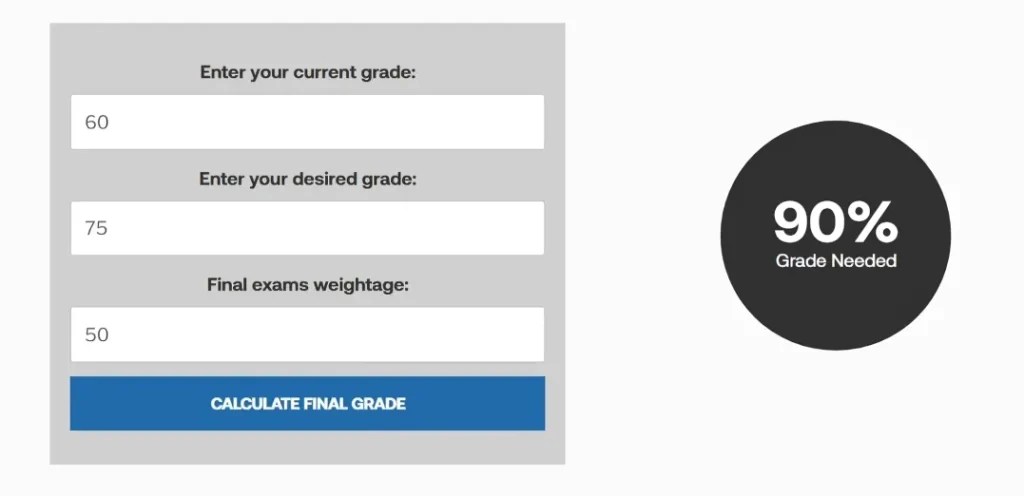
Let’s say:
A grading calculator would show that you need around 97.5% on the final to hit that 90 overall.
That tells you exactly where to focus your study time — high-impact areas first!
Tips for Best Results
Teachers — This Works For You Too!
You don’t have to be a student to benefit from this! Teachers can use a grading calculator to:
No more spreadsheets full of formulas — just clear math and quick results!
Keep Your Grades On Track With Regular Check-ins
One of the easiest ways to make sure you’re on the right path is to use the grading calculator regularly. Update it after each test, quiz, or homework submission so you can always see where you stand.
By staying on top of your grades, you can:
- Adjust your study strategy if needed
- Avoid any last-minute cramming
- Ensure you’re aiming for realistic and achievable goals
Regular check-ins also help reduce the anxiety of not knowing what your grades will be at the end of the semester. So, make it a habit!
How to Use Grading Calculators for Group Work or Projects
While grading calculators are great for individual assessments, they can also be helpful when calculating group project grades. Group projects often have a mix of individual and group scores that are weighted differently.
Here’s how a calculator can help:
- Input the individual grades for each group member (if available).
- Use the overall group score and add it into the weighted formula for the class.
- You can see how much each person contributed to the final group grade and quickly get an idea of what adjustments, if any, are needed.
FAQs
CONCLUSION
Using a simple grading calculator isn’t just about numbers — it’s about confidence and clarity. You’ll know where you stand, what you need, and how to get there. Whether you’re prepping for finals or planning study schedules, a grading calculator can be your best academic tool


