

What Features Make a Grading Calculator Effective?
A grading calculator is effective when it does more than show one number. It should help you understand your current grade, handle weighted categories correctly, predict what you need on future work, and make the whole process simple and stress-free. Quick Grade The best tools today usually include weighted grade support, target-grade prediction, multiple grading formats, instant updates, and private in-browser use.
Whether you are a student planning for finals or a teacher checking marks, the right calculator saves time and reduces mistakes. A weak tool can confuse you. A good one gives clear answers fast and helps you make better decisions. That is what really makes a grading calculator useful.
1. Accurate grade calculation is the most important feature
The first job of any grading calculator is simple: it must be correct. If the math is wrong, the rest of the features do not matter. A good calculator should handle percentages, points, and weighted averages without giving confusing or inconsistent results. Many of the strongest pages ranking now lead with accuracy because users care about trust first.
Accuracy also means matching real class rules. Some courses grade by assignment, some by category, and some by final exam weight. A strong calculator should reflect the syllabus, not force every class into the same format. That helps students avoid false hope and helps teachers keep grading fair.
2. It should support weighted grades
Not every assignment counts the same. In many classes, homework may be worth 20%, quizzes 15%, a midterm 30%, and a final exam 35%. A calculator that ignores weighting can give a result that looks nice but is actually wrong. That is why weighted grade support is one of the most common features on leading grade calculator pages.
This feature matters because it shows where your real progress comes from. A student may score high on small homework tasks but still need to improve exam performance. A good grading calculator shows that clearly and helps users focus on the work that has the biggest impact.
3. It should show what grade you need next
One of the most helpful features is target-grade prediction. In plain words, this means the calculator can tell you what score you need on your final exam, project, or remaining assignments to reach your goal. Many competitor tools push this feature because it answers a real question students ask every semester: “What do I need to get an A?”
This feature makes a calculator feel practical, not just mathematical. It turns your current grade into a plan. Instead of guessing, you can see whether your goal is realistic and where to put your effort. That makes the tool more useful for both planning and motivation.
4. It should work with different grade formats
A strong grading calculator should not only accept percentages. Many users also need letter grades, GPA scales, points, or custom grading systems. Current ranking tools often promote support for percentage grades, letter grades, and GPA because schools and teachers do not all use the same format.
This flexibility matters because it saves time and avoids manual conversion. A student should not need one calculator for percentages, another for GPA, and a third for letter grades. One smart tool should cover all of them in a clean way.You can also read: How Teachers Can Quickly Grade Multiple Tests
5. It must be easy to use
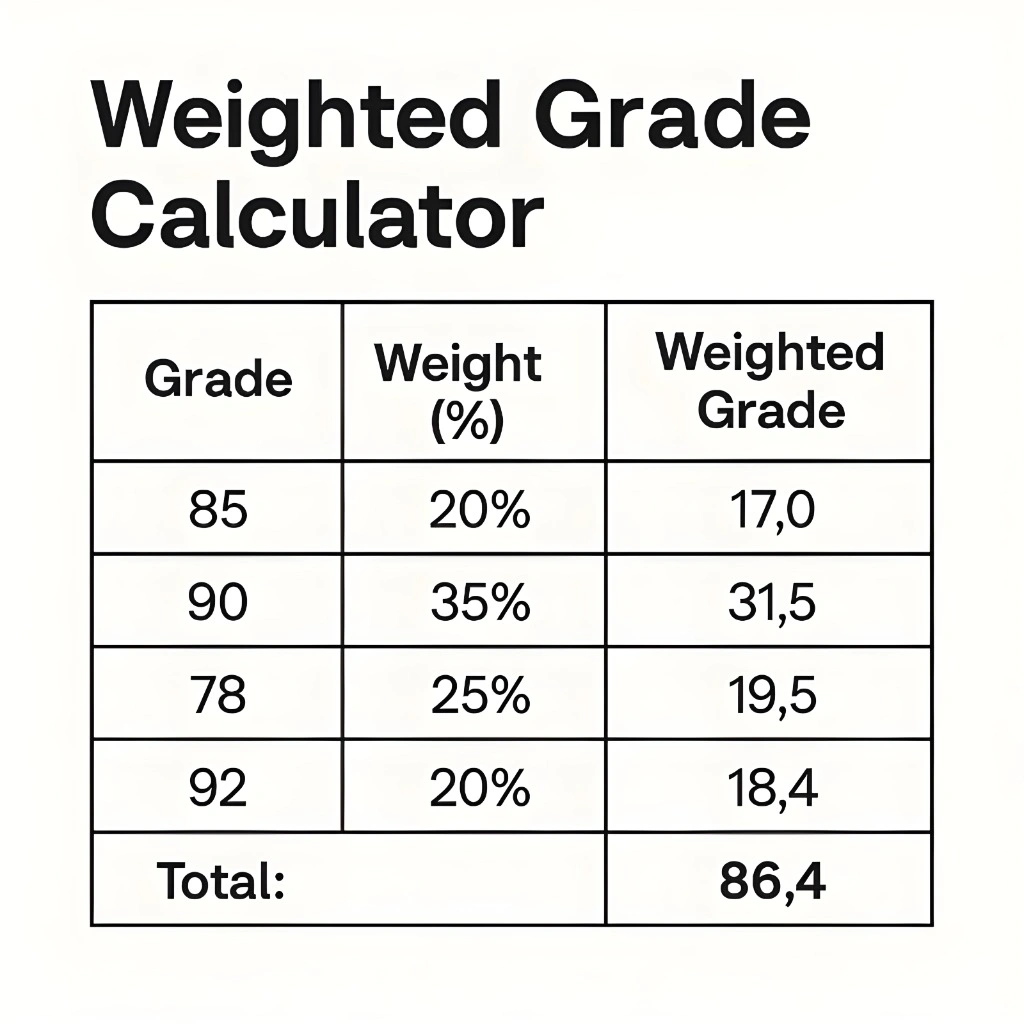
Even the smartest grading calculator fails if the layout is messy. Users want a simple screen, clear labels, and fast inputs. They should be able to add grades, change weights, and see results without reading a long manual. Google’s guidance also favors content and pages that are easy to use, especially on mobile, without distracting elements getting in the way.
A simple design is not just about looks. It lowers mistakes. When users can clearly see grade boxes, weight fields, and final results, they are more likely to trust the outcome. That is especially important for stressed students checking grades before exams.
6. Real-time updates make the tool more useful
An effective calculator should update results instantly as you type. This real-time feedback helps users test different scores, compare outcomes, and understand how each assignment changes the final grade. Competitor pages often promote live or instant updates because they make the tool feel more interactive and helpful.
This is especially useful for “what-if” planning. For example, a student can change a future exam score from 75% to 85% and immediately see how much difference it makes. That turns a calculator from a static tool into a decision helper.
7. Custom options make it fit real classrooms
Every class is a little different. Some teachers offer extra credit. Some drop the lowest quiz score. Some use plus/minus grades. That is why the best tools now include flexible settings instead of one rigid system. Several current tools highlight drop-lowest, extra credit, custom scales, and similar options as major benefits.
These options matter because real grading rules are not always basic. A calculator becomes much more effective when it matches the actual classroom policy rather than forcing users to do manual adjustments outside the tool.
8. Privacy is a big trust signal
A lot of students do not want to sign up just to check a grade. That is why privacy matters. Some current grading calculators make it clear that calculations happen in the browser and no data is sent to servers. This simple promise can make users feel safer and more willing to use the tool again.
For website owners, this is also a strong conversion point. When users know they can calculate grades without creating an account, the experience feels faster and more honest. That can improve return visits and trust.
9. Mobile-friendly design is no longer optional
Many users check grades on their phones, not desktops. A grading calculator should load fast, display clearly on small screens, and let users enter numbers without zooming or scrolling sideways. Google says page experience includes good mobile display, secure pages, and avoiding intrusive elements that interrupt the main content.
So if you want a grading calculator page to perform well in search, mobile usability is part of the package. The tool itself may be excellent, but if the page is hard to use on a phone, users may leave before they finish.
10. Clear explanations add real value
Many grade tools show numbers but do not explain them. A better calculator tells users what the result means. It should explain weighted averages in simple words, show examples, and answer common questions like why a weighted average is different from a simple average. High-performing pages often combine the calculator with basic explanations, formulas, or examples for exactly this reason.
This is also where content quality improves. Google’s current guidance says helpful content should be made for people first, be unique, and answer real needs clearly. A calculator page with simple explanations is more useful than one that just repeats keywords.
11. Export and save features are a bonus
Not every user needs this, but export and save tools can be very helpful. Some current calculators offer export reports, saved browser data, or performance charts. These features are useful for students who track grades all term and for teachers who want to keep a record.
Still, these should stay optional. The main experience should remain quick and simple. A grading calculator becomes less effective when extra features make the page slow or confusing. Google’s page experience guidance supports this idea by encouraging easy access to main content without distractions.
12. The best grading calculator helps users take action
At the end of the day, the best grading calculator is not the one with the most features. It is the one that helps a person make a smart next step. Can it show your current standing? Can it tell you what score you need next? Can it match your class rules? Can you use it quickly on your phone? If the answer is yes, then it is doing its job well.
A grading calculator should reduce stress, not add to it. It should feel clear, fast, and honest. That is what makes it effective for real users.
Quick tips for choosing a good grading calculator
Check whether it supports weighted grades before you trust the result. Look for a target-grade feature if you want to plan for finals. Pick a tool that works on mobile and does not force sign-up for basic use. And always compare the settings with your course syllabus so the numbers match real class rules.
FAQ
What is the most important feature in a grading calculator?
Accuracy is the most important feature. If the math is wrong, the calculator cannot be trusted, even if it looks modern or has many extra tools.
Why is weighted grading support important?
Because many classes do not count every assignment equally. Weighted support helps match the calculator to the syllabus and gives a more realistic final result.
Can a grading calculator help me prepare for finals?
Yes. Many effective tools include a feature that shows what score you need on your final exam or remaining assignments to reach a target grade.
Should a grading calculator support GPA and letter grades too?
Yes, that makes the tool more flexible. Many users need to switch between percentages, letter grades, and GPA depending on their school system.
Does privacy matter in a grading calculator?
Yes. Many users prefer tools that work in the browser without sending personal grade data to a server or forcing account creation.
Conclusion
So, what features make a grading calculator effective? The short answer is accuracy, weighted grading, target-score prediction, multiple grade formats, ease of use, privacy, and mobile-friendly design. Extra options like drop-lowest scores, extra credit, and export tools can make it even better. The best grading calculator does not just calculate. It helps users understand, plan, and feel more confident about their grades


