

How Grading Calculators Help Teachers Avoid Burnout
Teaching is one of the most rewarding careers, but it can also be one of the most demanding. With lesson planning, classroom management, and student engagement,Quick Grade, it’s easy to feel overwhelmed. On top of that, grading takes up a huge portion of a teacher’s time — and it’s often the most exhausting part of the job.
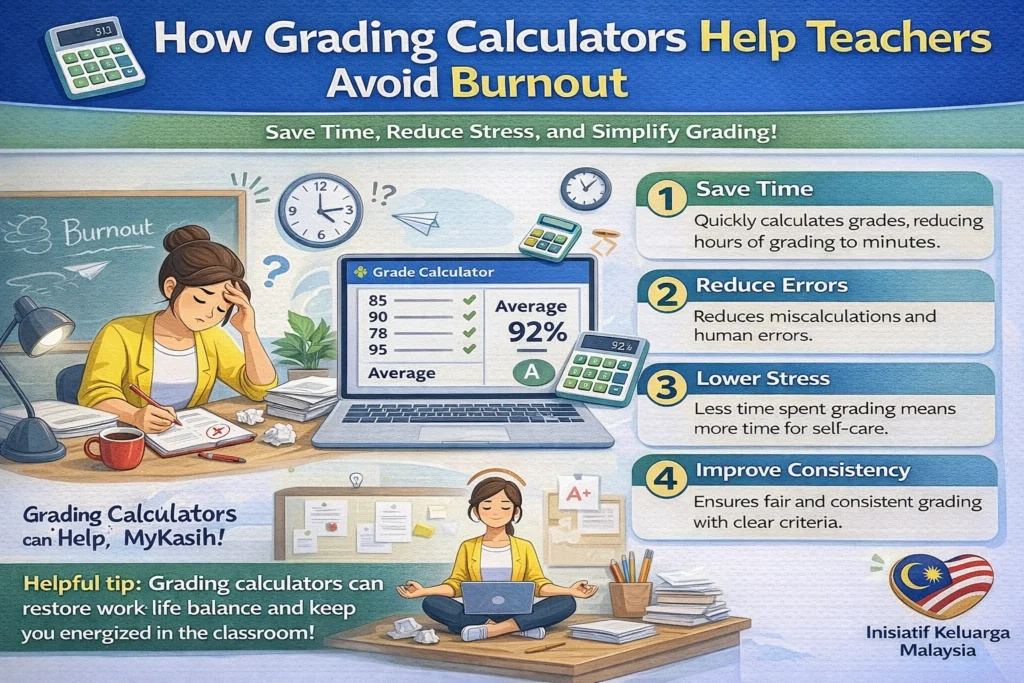
But what if there was a way to make grading easier and more efficient? Grading calculators are the perfect solution. These tools can save you time, reduce stress, and help you avoid burnout by making grading quicker, more organized, and more consistent.
Here’s how grading calculators can help you work smarter, not harder.
1. Automate Repetitive Tasks
Grading multiple-choice tests, quizzes, and assignments can feel like a never-ending task. If you’re still manually calculating scores or tallying up points, it can take hours — especially if you have a large class.
Grading calculators take care of the math for you. Once you enter the student’s answers or scores, the calculator does all the heavy lifting and instantly gives you the final grade.
- Multiple-choice tests can be graded in seconds with no mistakes.
- For weighted grades, the calculator applies the right percentages, saving you from manual math.
By eliminating repetitive tasks, grading calculators give you back valuable time to focus on your students and lessons, which means less chance of feeling burned out.
Tip: Use calculators that integrate with your gradebook so you don’t need to re-enter data. This makes the grading process even faster.
2. Reduce Mental Fatigue
Grading can be mentally exhausting, especially when you’re dealing with dozens (or hundreds) of papers. After a while, your brain can get tired of making decisions, adding up points, and checking work. That mental fatigue can lead to burnout.
Grading calculators eliminate much of this cognitive load by automating the math and scoring. Instead of having to constantly check your work and worry about errors, you can trust the calculator to handle the number-crunching.
- With fewer calculations to do manually, your brain has more energy to focus on other tasks — like offering feedback or finding new ways to engage students.
Tip: Use grading calculators with built-in feedback features so you can provide personalized comments without doing double the work.You can also read: How to Quickly Generate Final Grades with Grading Tools
3. Increase Consistency and Fairness
One of the most challenging parts of grading is ensuring fairness. When you’re grading a large number of assignments, it’s easy to miss something, apply different standards to different students, or forget to check for certain criteria. This inconsistency can lead to frustration and burnout.
Grading calculators help keep things consistent by applying the same standards to each student’s work. If you set up a rubric or grading scale, the calculator will follow it exactly every time. This ensures every student is graded fairly, and it frees you from having to remember every detail.
- Rubric-based calculators ensure that you don’t miss important aspects of the assignment.
- They also give you an easy-to-read summary of how each student performed, so you don’t have to recheck your grading process.
Tip: Share your rubric with students ahead of time so they know exactly what you’re looking for in their responses.
4. Handle Bulk Grading Efficiently
If you have a large class, grading can easily take up your entire weekend. Going through each paper one by one is not only time-consuming but also draining. Grading calculators that allow bulk grading make it easier to handle large volumes of work.
- With a grading calculator, you can input multiple scores at once, speeding up the process.
- For online quizzes or tests, grading calculators can automatically grade hundreds of papers as soon as they are submitted.
This bulk grading feature can cut hours off your grading time, reducing the risk of burnout by helping you stay organized and efficient.
Tip: Use tools that let you grade and track scores all in one place, like Google Classroom or Canvas, to save even more time.
5. Streamline Feedback with Templates
One of the most time-consuming parts of grading is writing feedback for every student. You want to give helpful, meaningful feedback, but it can be hard to keep up with a large group of students, especially if you’re grading late into the evening.
Many grading calculators let you create feedback templates that you can use across multiple students. Instead of writing the same comment over and over again, you can simply select pre-written feedback and adjust it as needed.
- This feature helps you save time while ensuring students get the feedback they need to improve.
- You can also add personalized comments quickly by choosing from a comment bank or template, so you don’t have to start from scratch every time.
Tip: Customize feedback templates for common mistakes or areas of improvement to make grading even faster.
6. Track Progress and Set Goals for Students
Burnout can happen when you feel like you’re grading without seeing real results. With grading calculators that provide analytics, you can see how students are progressing throughout the course.
- Many calculators provide class averages, individual student progress, and even visual graphs to help you track performance over time.
- This allows you to identify students who may need extra help and offer targeted support before it’s too late.
By using analytics, you can be more proactive in addressing issues, instead of constantly feeling behind. This helps reduce the stress and workload that can contribute to teacher burnout.
Tip: Use class-wide progress reports to celebrate improvements and motivate students to keep working hard.
(FAQs)
1. Can grading calculators help with all types of assignments?
Yes! Grading calculators can handle different types of assignments, from multiple-choice tests to essays. Many tools allow for customizable rubrics to grade more complex assignments.
2. Are these tools difficult to use?
Most grading calculators are designed to be user-friendly, even for teachers who aren’t tech-savvy. Many platforms offer tutorials or guides to help you get started quickly.
3. How do grading calculators handle extra credit?
Most digital grading tools allow you to easily add extra credit, either by adjusting the total points or adding points to a student’s existing score.
4. Will a grading calculator work if my grading system is weighted?
Yes! Many grading calculators are specifically designed to handle weighted grades, so you can set different weights for different types of assignments or exams.
5. Can grading calculators provide feedback to students?
Yes, many grading calculators allow you to give feedback. Some even let you save comments in a template or comment bank, making it easier to provide consistent feedback quickly.
Final Thoughts:
Grading doesn’t have to drain your energy or lead to burnout. With the right grading calculator, you can save time, stay organized, and give your students consistent, fair feedback without overworking yourself. These tools help reduce the mental fatigue and repetitive tasks that contribute to stress, so you can enjoy teaching without feeling overwhelmed.
Start using a grading calculator today and experience the relief of a more streamlined, efficient grading process. Your time, energy, and well-being are worth it!


