

How to Quickly Grade Essays with Grading Tools 2026
Grading essays can be time-consuming and sometimes a little overwhelming. But it doesn’t have to take forever. With the right approach and tools, Quick Grade you can grade faster while still giving students good feedback. Let’s break it down in a way that’s easy to follow — like tips from a friend.
1. Start With a Clear Rubric (Your Best Friend)
A rubric is basically a checklist of how you’ll score an essay. It spells out what you’re looking for — like thesis strength, evidence, organization, grammar, and style.
- Having a rubric makes grading consistent and faster.
- Students also understand what you expect from the start.
- You can create separate sections for content vs grammar so you don’t try to fix every single error.
Tip: Share your rubric with students before they write. That way, they know the game plan and quality rises naturally.You can also read: Best Grading Tools for Handling Class Average Analytics 2026
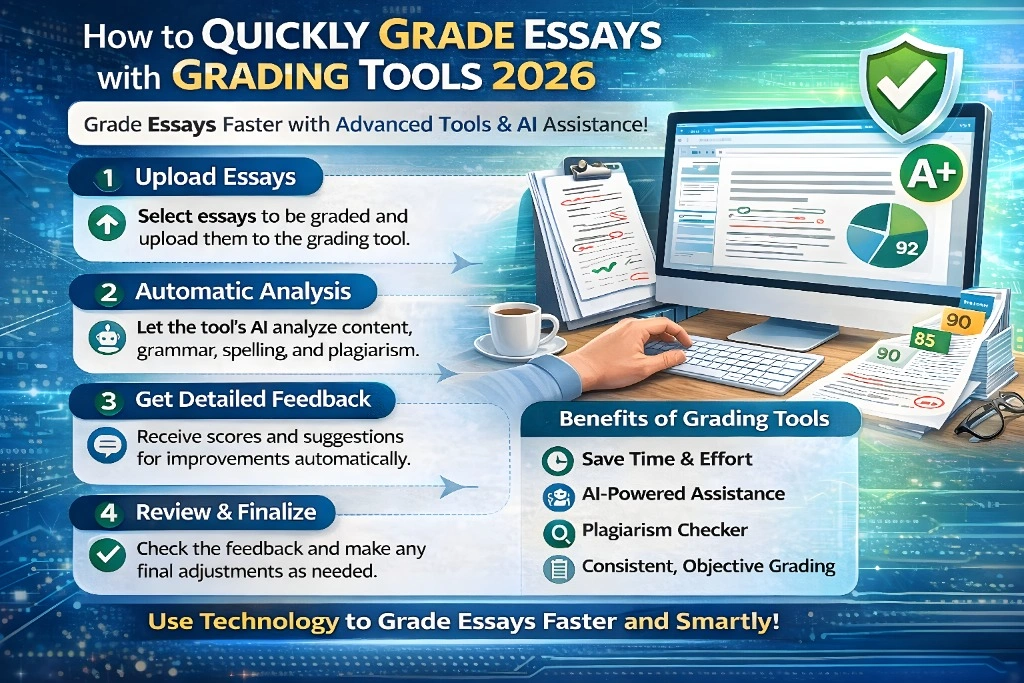
2. Use Essay Grading Tools to Speed Things Up
There are tools designed to help you grade essays faster — some use AI, others use simple scoring systems.
Here are a few kinds:
- AI Grading Helpers: Tools like AI essay graders can give you instant first-pass feedback or a preliminary grade. They look at structure, clarity, arguments, and even grammar.
- Rubric-based Grading Tools: You can upload your rubric and the essays, and the system applies the criteria for you.
- Grammar & Feedback Tools: Easy graders flag writing issues so you can focus on higher-level feedback.
Tip: Always review the tool’s suggestions — don’t just accept them blindly. Think of the tool as your helper, not the final judge.
3. Bulk Upload and Batch Grade (Time Saver!)
If you have a class full of essays, look for systems that let you bulk upload multiple files at once. That way:
- You don’t waste time opening one file at a time.
- You can skim quickly, then let the tool highlight what matters.
Tip: Group similar essays together when grading manually — it helps keep your brain in the same mode and speeds things up.
4. Focus on What Matters Most
Don’t try to fix every little thing. Great grading focuses on a few big points:
- Does the essay answer the question?
- Is the supporting evidence strong?
- Does the writing make sense?
Less essential details (like tiny punctuation errors) can be left for students to fix later or caught by tools.
Tip: Limit yourself to 2–3 major corrections per paper. Students tend to learn more from that than a wall of red ink.
5. Give Clear, Fast Feedback
Students want feedback they can use. Instead of long paragraphs:
- Use short bullets or highlight the rubric area.
- Tell them one thing they did well and one thing to improve.
Tools can even generate feedback for you — you just tweak it before publishing.
6. Save Time With Peer Review (When Appropriate)
Another trick is to let students grade each other against your rubric. It saves you time and helps them think about quality writing.
Rubrics make peer review more fair and useful.
Tip: Some tools let students submit peer reviews directly in the system. This reduces your workload and builds writing skills.
FAQs
1. How accurate are AI grading tools?
AI grading tools can be surprisingly accurate for initial drafts or giving quick feedback. However, they may not always catch nuances in creativity or complex arguments. It’s best to use AI as a first-pass assistant and still review the paper yourself for deeper insights.
2. Can I use grading tools for every type of essay?
Yes, most grading tools work for various essay types, from persuasive to analytical. However, they work best with structured essays, like those with clear arguments or standardized formats. For creative essays, you might want to use the tool alongside your own judgment.
3. Are there free essay grading tools?
There are a few free tools, such as PaperRater and Grammarly’s basic version. These can help with grammar, clarity, and style. For more comprehensive grading with rubrics or AI, you’ll need to invest in a paid tool.
4. Can students use grading tools to check their own work before submission?
Absolutely! Many students use grading tools like Grammarly or ProWritingAid to improve their essays before submitting. It’s a great way for them to spot and fix issues themselves, reducing the burden on you.
5. How do I ensure my feedback is useful to students?
Keep your feedback clear and specific. Focus on one or two key areas for improvement, and praise what the student did well. Offering actionable steps or resources for improvement is also a big plus!
Final Thoughts
Grading essays quickly doesn’t mean rushing or being unfair. It means:
- Using a clear system (rubrics),
- Letting smart tools help you,
- Focusing on what really matters, and
- Giving feedback that makes writing better.
With the right tools and strategy, grading becomes something you finish faster — and students still get the guidance they need.


