

Speed Up Essay Grading Using a Quick Grade Calculator
Grading essays is often the most time-consuming part of teaching. With subjective grading criteria and the need for thoughtful feedback, it can take hours to grade just one assignment. But what if there was a way to speed up essay grading Quick Grade while ensuring accuracy and consistency?
A quick grade calculator can help you do just that. These tools can automate parts of the grading process, like scoring based on a rubric, calculating final grades, and offering streamlined feedback. Here’s how you can use a quick grade calculator to speed up essay grading and get more time back for teaching.
1. Use Rubric-Based Grading for Faster, Consistent Scoring
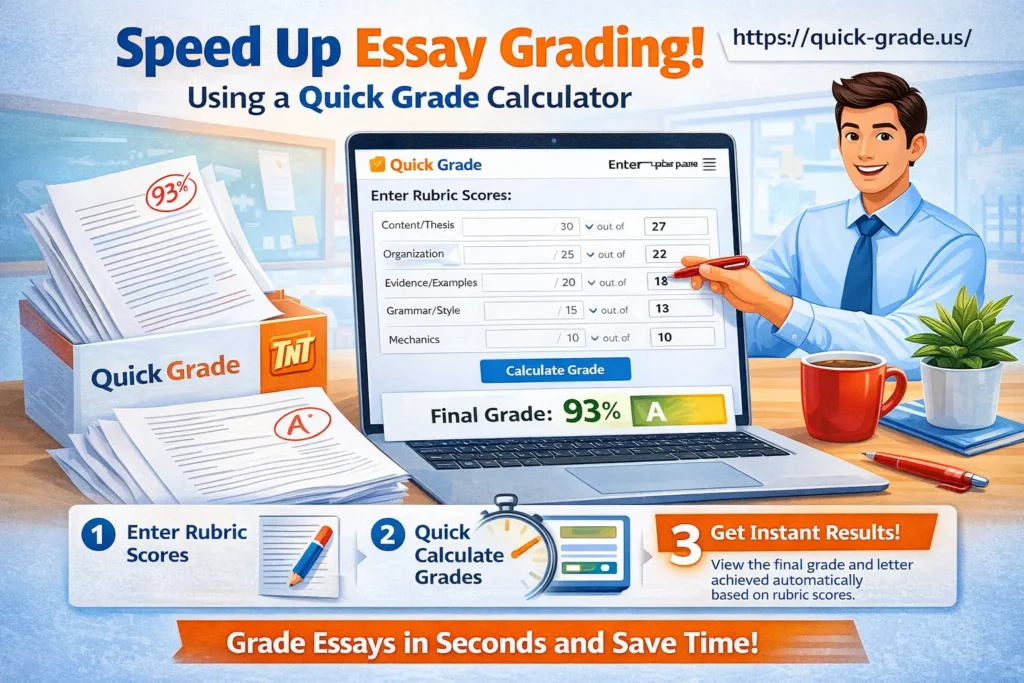
One of the most efficient ways to grade essays is by using a grading rubric. A rubric provides clear criteria for grading (e.g., thesis statement, argument quality, grammar), making the process more objective and faster.
- How It Works:
A quick grade calculator can use a custom rubric that you set up for each assignment. Once you grade the essay according to the rubric, the calculator automatically computes the final score based on the criteria you’ve established. - Why It Speeds Up Grading:
With a rubric in place, you don’t have to write the same comments or perform the same checks on every paper. The calculator helps you score essays quickly and consistently.
Tip: Make sure your rubric is clear and detailed, so the grading calculator can apply it accurately for each student..YOU CAN ALSO READ: “How to Handle Partial Credit with a Grading Calculator”
2. Automate the Calculation of Final Grades
Once you’ve graded the essays using a rubric, the next task is calculating the final grade. If you’re handling a lot of essays, manually calculating final grades for each student can take a lot of time.
- How It Works:
Many quick grade calculators allow you to input assignment weights (e.g., 50% for the essay, 30% for homework, 20% for participation), and the tool automatically calculates the final grade for each student. - Why It Speeds Up Grading:
You don’t need to do any of the math yourself. The calculator handles everything, saving you time and reducing the chance of errors.
Tip: Double-check that your weights are set up correctly before calculating final grades to ensure accuracy.
3. Provide Instant Feedback with Pre-Written Comments

Providing personalized feedback on essays is a critical part of grading, but it can be time-consuming. The good news is that many quick grade calculators let you create pre-written feedback or comment banks that you can quickly insert into students’ graded essays.
- How It Works:
You can set up a list of common feedback comments (e.g., “Great argument, but needs more evidence” or “Be sure to proofread for grammar”). When you’re grading, you can select comments from the bank and add them with one click. - Why It Speeds Up Grading:
Instead of writing the same feedback repeatedly, you can use pre-written comments, which saves time while still providing valuable feedback to students.
Tip: Personalize your comments where needed, and use the comment bank for common areas of improvement.Easy Grader,
4. Track Student Progress Across Multiple Essays
If you have multiple essays to grade throughout the semester, it can be difficult to track each student’s progress. However, many quick grade calculators provide tracking tools that allow you to see how students are improving (or struggling) over time.
- How It Works:
Once you’ve graded multiple assignments, the calculator can automatically show you class averages, individual student progress, and trends in performance. - Why It Speeds Up Grading:
By offering a clear view of each student’s performance, you can more easily identify which students need additional help, allowing you to focus your time where it’s most needed.
Tip: Use progress reports to keep students informed about their performance and set goals for improvement.
5. Use Analytics to Identify Common Mistakes
A quick grade calculator doesn’t just help you grade more efficiently — it can also provide valuable analytics on class performance. Many tools allow you to see where students are excelling and where they’re struggling.
- How It Works:
After grading multiple essays, the calculator provides class averages or performance trends for each rubric category (e.g., clarity, organization, grammar). You can quickly identify patterns and common mistakes. - Why It Speeds Up Grading:
You won’t have to go through each essay individually to spot trends. The tool does this for you, so you can spend less time analyzing and more time addressing class-wide issues.
Tip: Use analytics to tailor your teaching and focus on the areas where students need the most help.
6. Generate and Share Reports Automatically
Once you’ve finished grading, you can generate detailed reports that summarize the grades, averages, and performance trends for the entire class.
- How It Works:
Many quick grade calculators allow you to export or email reports directly to students or administrators. These reports include final grades, class averages, and insights into student performance. - Why It Speeds Up Grading:
You don’t have to create reports manually. The calculator generates them for you, saving you time and making it easier to share results quickly.
Tip: Set up automatic notifications or exports to have grades and reports sent to students or parents directly.
Best Quick Grading Calculators for Essay Grading
Here are some excellent quick grading calculators that can help you speed up essay grading:
- Google Sheets with Add-ons (e.g., Flubaroo, Gradebook): Free and customizable, with easy integration for grading.
- GradeHub: A simple tool for handling weighted grades and rubrics.
- Gradescope: Ideal for rubric-based grading, especially for essays and projects.
- Quizizz: Great for quick quizzes with automatic grading and instant feedback.
(FAQs)
1. Can quick grading calculators be used for essays?
Yes, many calculators support rubric-based grading, which is perfect for grading essays, as it ensures consistency and speeds up the process.
2. Are grading calculators free to use?
Many quick grading calculators offer free versions, especially for basic grading needs. Some tools may have paid features for more advanced options.
3. Can I track student progress over multiple essays?
Yes! Many grading calculators provide analytics or progress tracking, allowing you to monitor each student’s improvement over time.
4. Do I still need to provide feedback for essays if I use a calculator?
While grading calculators can help speed up the process, you can still provide personalized feedback using pre-written comments or rubrics. Some calculators even offer automated feedback for common mistakes.
5. Can grading calculators handle weighted grades?
Absolutely! Grading calculators can handle weighted grades and will automatically calculate final grades based on the weights you set for each assignment or category.
Final Thoughts
Grading essays doesn’t have to be a long, drawn-out process. By using a quick grading calculator, you can speed up grading, ensure accuracy, and maintain consistency. These tools save you time and help you focus on the most important part of teaching — helping your students succeed.
Start using a quick grading calculator today to make essay grading easier and faster, and spend more time engaging with your students!


