

Easy Grader for Math Tests with Half Points A Simple Solution
Math tests can often be tricky to grade, especially when you’re trying to give partial credit for incomplete answers. While you want to reward students for their efforts, it can be difficult to keep track of all those half-point scores manually.Quick Grade, But don’t worry—an easy grader for math tests with half points can make your grading process faster and more efficient, without compromising fairness.
What Is an Easy Grader for Math Tests?
An easy grader for math tests is a tool designed to help teachers quickly calculate student scores on multiple-choice, short answer, or long-form math problems. The best part? It can handle half-point grading, which means you can reward students who almost got the answer right but missed just a small detail.
Why Use an Easy Grader?
1. Saves Time: Grading can be time-consuming, especially when you’re handling large classes. An easy grader helps you speed up the process by automating most of the calculations, saving you hours each week.
2. Fair Grading: Not all answers are black and white. Sometimes a student shows a good understanding of a concept but makes a small mistake. With half-point grading, you can give partial credit where it’s due, ensuring students are fairly rewarded for their efforts.
3. Accurate Scores: Tracking half-points manually can lead to mistakes. Using an easy grader tool ensures that you don’t miss any points and that the final score accurately reflects the student’s performance.
How Does It Work?
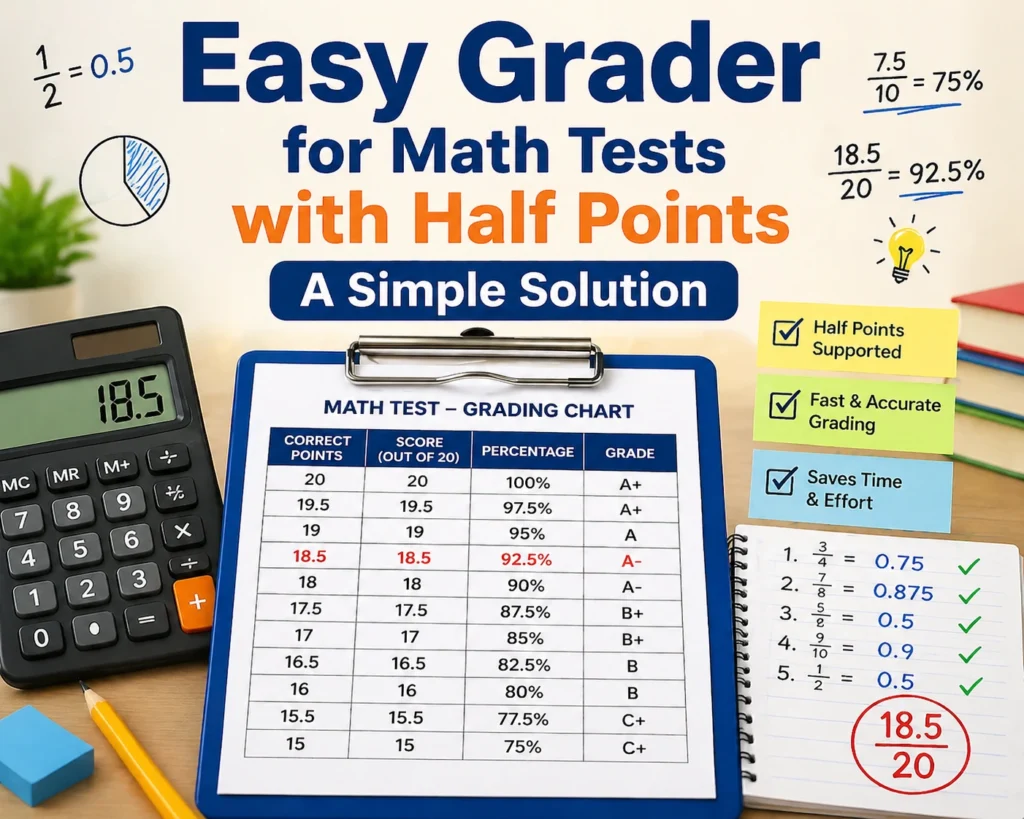
Most easy grader tools are simple to use. All you need to do is enter the total number of questions and the number of correct answers, and the tool will calculate the score. Some tools even let you customize the grading scale to include half-points for partial answers.
Here’s a quick step-by-step guide on how to use an easy grader:
- Enter the Test Details: Input the total number of questions in the test.
- Add the Correct Answers: Enter the number of correct answers the student gave.
- Customize Grading: If needed, enable half-point grading for more flexibility.
- Get the Score: The tool will automatically calculate the student’s final score.
Tips for Using an Easy Grader with Half Points
1. Be Clear About Partial Credit: When using half-point grading, make sure to explain the grading system to your students. Let them know that partial credit will be awarded for incomplete or partially correct answers. This clarity will motivate them to give their best effort, even on tricky questions.
2. Use for Both Homework and Tests: You can use easy graders not only for major exams but also for homework assignments. This consistency in grading helps students understand where they stand at any given point.
3. Experiment with Different Scales: Some students may feel that half-points don’t fully reflect their effort. Try experimenting with a point system that works best for your class, like awarding quarter-points for even more nuanced grading.You can also read: How to Calculate What a Student Needs to Pass 2026
Recommended Easy Grader Tools
- Math Grader: A simple online tool that supports half-point grading. You can enter your test information and get the scores in seconds.
- GradeMaster: A more advanced tool with the ability to create custom grading scales and track student progress over time.
- Easy Grade Calculator: Great for teachers looking for something lightweight but reliable. It lets you easily adjust for half-points.
FAQs
1. Can I use an easy grader for all types of math problems?
Yes! Most easy grader tools can be used for multiple types of math problems, including multiple-choice, short answer, and long-form questions. Simply input the total number of questions and correct answers, and the tool will do the rest.
2. How do half-points affect students’ final grades?
Half-points allow for more accurate grading, especially for students who show partial understanding but make small mistakes. This can help boost their scores and motivate them to improve, ensuring they are rewarded for their effort.
3. Are easy grader tools free to use?
Many easy grader tools are free to use, especially the basic versions. Some advanced tools with extra features, such as custom grading scales and progress tracking, may require a subscription or one-time payment.
4. Can I adjust the grading scale for different tests?
Absolutely! Most easy grader tools allow you to customize the grading scale to fit the specific needs of your test. You can add half-points, quarter-points, or any other scale you prefer to ensure fair grading.
5. How accurate is an easy grader tool?
Easy grader tools are highly accurate, as they automate the calculations. However, it’s important to double-check any manually entered data, such as the number of correct answers, to ensure the tool calculates the score correctly.
Conclusion
An easy grader for math tests with half points is a game-changer for teachers who want to make grading more efficient and fair. By allowing for partial credit, these tools help reflect the true effort of students and make grading a lot easier. Whether you’re a new teacher or an experienced educator, using an easy grader can save you time and ensure your grading process is accurate and transparent.


