

How to Calculate Final Grades With Categories 2026
Calculating final grades can get tricky when your assignments are divided into categories, such as homework, quizzes, tests, and projects. Quick Grade Each category may carry a different weight toward the final grade, and mixing points without proper calculation can lead to errors or unfair grades.
This guide explains how to calculate final grades with categories accurately, step by step, with tips for avoiding common mistakes.

What Are Grade Categories?
Grade categories group assignments by type or purpose. Examples include:
- Homework: 20% of final grade
- Quizzes: 25%
- Projects: 30%
- Exams: 25%
Each category has a weight, which determines how much it contributes to the overall grade. Weighted grading ensures that more important tasks, like exams or major projects, have a bigger impact than smaller assignments.
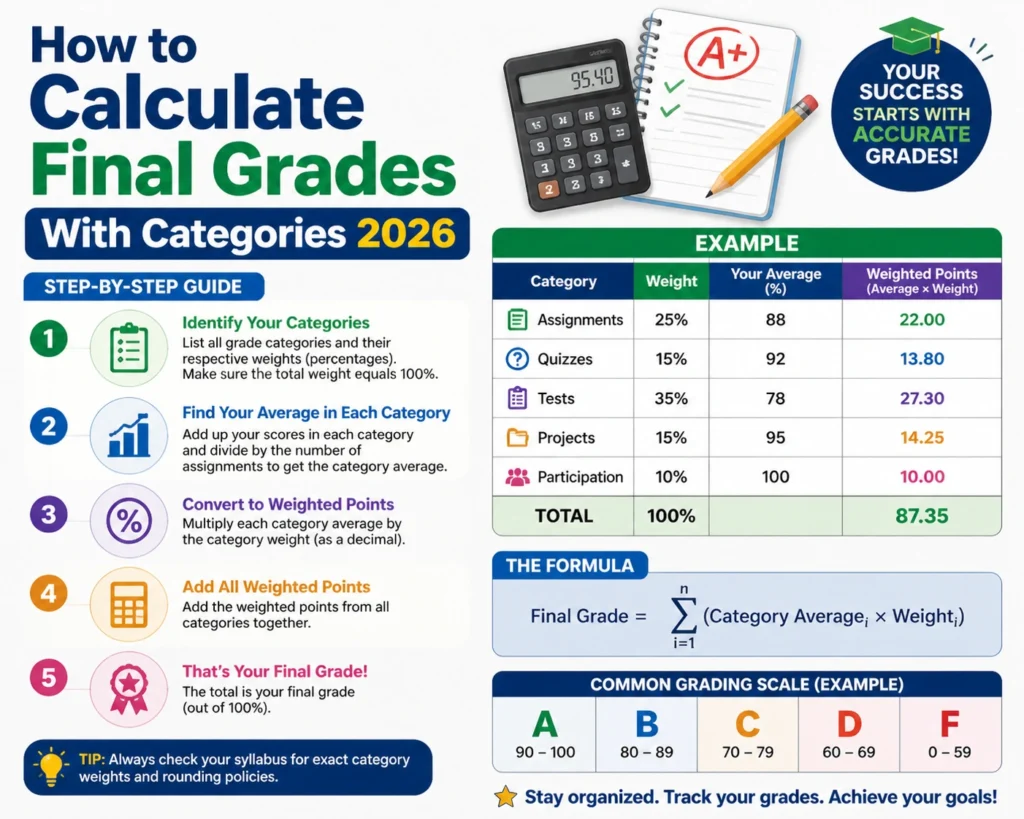
Step-by-Step: Calculating Final Grades With Categories
Step 1 – Calculate Each Category Average
For each category, find the average percentage of points earned:
Example: Homework
- Total points possible: 50
- Points earned: 45
- Average: 45 ÷ 50 × 100 = 90%
Repeat this for all categories (quizzes, projects, exams, etc.).
Step 2 – Convert Category Weights to Decimals
Convert each category’s weight to a decimal for calculation:
- Homework 20% → 0.20
- Quizzes 25% → 0.25
- Projects 30% → 0.30
- Exams 25% → 0.25
Step 3 – Multiply Category Average by Weight
For each category, multiply the average score by the decimal weight:
- Homework: 90 × 0.20 = 18
- Quizzes: 80 × 0.25 = 20
- Projects: 85 × 0.30 = 25.5
- Exams: 92 × 0.25 = 23
Step 4 – Add Weighted Scores for Final Grade
Add all weighted category scores together:
18 + 20 + 25.5 + 23 = 86.5% final grade
This is the student’s overall grade based on categories and weights.You can also read: Teacher Grader for Large Classrooms 2026
Tips for Accurate Category-Based Grading
- Use a spreadsheet or digital gradebook: It automates calculations and reduces errors.
- Double-check weights: Make sure all category weights add up to 100%.
- Track missing assignments: Decide if missing work counts as zero or is excluded temporarily.
- Communicate grading policies: Students and parents should know how categories affect grades.
- Use consistent point systems within categories: Avoid mixing very different point scales without converting to percentages.
Example Table: Final Grade Calculation
| Category | Average % | Weight | Weighted Score |
|---|---|---|---|
| Homework | 90 | 20% | 18 |
| Quizzes | 80 | 25% | 20 |
| Projects | 85 | 30% | 25.5 |
| Exams | 92 | 25% | 23 |
| Total | 100% | 86.5 |
FAQs
1. What if a category has no assignments yet?
You can either exclude it temporarily or enter zeros, depending on your school’s grading policy.
2. Can I include extra credit in categories?
Yes. Add extra credit to the total points possible or earned and calculate the category average accordingly.
3. Do all categories have to add up to 100%?
Yes. Total category weights should sum to 100% to reflect the final grade accurately.
4. How do missing assignments affect category averages?
Decide if missing work counts as zero or is excluded. Include your policy consistently across all students.
5. Can weighted grades be automated?
Yes. Use a spreadsheet or digital gradebook to calculate final grades automatically and reduce manual errors.
Final Words
Calculating final grades with categories ensures fair, accurate, and meaningful assessment for students. By understanding category weights, averaging scores, and applying weights properly, teachers can give students a clear picture of their performance. Using spreadsheets or digital gradebooks makes the process faster, reduces errors, and makes grading more efficient — leaving teachers more time to focus on instruction and students more clarity about their progress.


